
教你如何理解WPF中的Template类
创始人
2024-03-26 10:50:35
0次
解释Template定义
Template用于定义控件结构(Visual Tree),和Style有点容易混淆,每个控件初始没有Style属性,而在WPF中所有的控件都有默认的Template。
列举Template结构
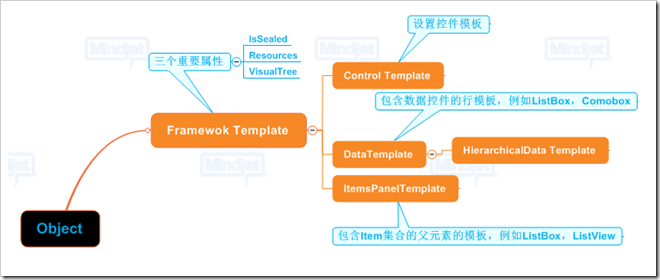
FrameworkTemplate & ControlTemplate
ControlTemplate 添加了两个属性: TargetType,Triggers
举例各种Template 1. ControlTempalte - 自定义BUTTON
"WpfApplication1.Window2"
    xmlns="http://schemas.microsoft.com/winfx/2006/xaml/presentation"
    xmlns:x="http://schemas.microsoft.com/winfx/2006/xaml"
    Title="Window2" Height="300" Width="300">
效果:

2. ItemsTemplate - 自定义ListBox对齐方式
"WpfApplication1.Window2"    xmlns="http://schemas.microsoft.com/winfx/2006/xaml/presentation"
    xmlns:x="http://schemas.microsoft.com/winfx/2006/xaml"
    Title="Window2" Height="300" Width="300">
TIP: VirtualizingStackPanel 可以替换为其他ItemsPanel,如WrapPanel,StackPanel,UnifromGrid等。
3. DataTemplate - 自定义ListBox ItemTemplate页面代码
"WpfApplication1.Window2"
    xmlns="http://schemas.microsoft.com/winfx/2006/xaml/presentation"
    xmlns:x="http://schemas.microsoft.com/winfx/2006/xaml"
    Title="Window2" Height="351" Width="473" xmlns:WpfApplication1="clr-namespace:WpfApplication1" xmlns:d="http://schemas.microsoft.com/expression/blend/2008" xmlns:mc="http://schemas.openxmlformats.org/markup-compatibility/2006" mc:Ignorable="d">
![]()
逻辑代码
using System;
using System.Collections.Generic;
using System.Linq;
using System.Text;
using System.Windows;
using System.Windows.Controls;
using System.Windows.Data;
using System.Windows.Documents;
using System.Windows.Input;
using System.Windows.Media;
using System.Windows.Media.Imaging;
using System.Windows.Shapes;
using System.IO;

namespace WpfApplication1
{
    ///
    /// Interaction logic for Window2.xaml
    ///
    public partial class Window2 : Window
    {
        public Window2()
        {

            InitializeComponent();


            listbox1.DataContext = GetPictures();


        }

        private IEnumerable GetPictures()
        {
            foreach(string str in Directory.GetFiles(@"C:\Users\Public\Pictures\Sample Pictures"))
                yield return new MyData() {ImageSource = str};
        }


    }

    public class MyData
    {
        public string ImageSource { get; set; }
    }
}
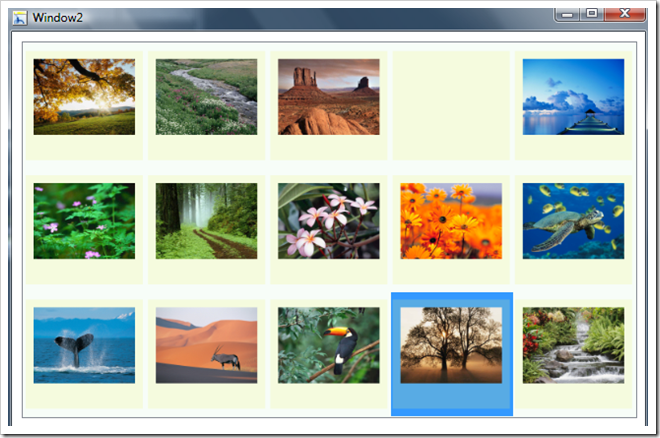
效果
我眼中的最佳实践
1. Please USE Blend to Customize Templates
请使用Blend来自定义模板
2. USE BasedOn Property Of Style
使用Style上的BasedOn属性
3. 使用共享资源,达到样式&Template重用
HOW: 在App.xaml中设置独立资源,或者使用外部资源
【编辑推荐】
- 详解Silverlight和WPF互相扩展
- Java代码的静态编译和动态编译中的问题比较
- 为WPF项目创建单元测试
相关内容
热门资讯
PHP新手之PHP入门
PHP是一种易于学习和使用的服务器端脚本语言。只需要很少的编程知识你就能使用PHP建立一个真正交互的...
网络中立的未来 网络中立性是什...
《牛津词典》中对“网络中立”的解释是“电信运营商应秉持的一种原则,即不考虑来源地提供所有内容和应用的...
各种千兆交换机的数据接口类型详...
千兆交换机有很多值得学习的地方,这里我们主要介绍各种千兆交换机的数据接口类型,作为局域网的主要连接设...
全面诠释网络负载均衡
负载均衡的出现大大缓解了服务器的压力,更是有效的利用了资源,提高了效率。那么我们现在来说一下网络负载...
什么是大数据安全 什么是大数据...
在《为什么需要大数据安全分析》一文中,我们已经阐述了一个重要观点,即:安全要素信息呈现出大数据的特征...
如何允许远程连接到MySQL数...
[[277004]]【51CTO.com快译】默认情况下,MySQL服务器仅侦听来自localhos...
如何利用交换机和端口设置来管理...
在网络管理中,总是有些人让管理员头疼。下面我们就将介绍一下一个网管员利用交换机以及端口设置等来进行D...
P2P的自白|我不生产内容,我...
现在一提起P2P,人们就会联想到正在被有关部门“围剿”的互联网理财服务。×租宝事件使得劳...
Intel将Moblin社区控...
本周二,非营利机构Linux基金会宣布,他们将担负起Moblin社区的管理工作,而这之前,Mobli...
施耐德电气数据中心整体解决方案...
近日,全球能效管理专家施耐德电气正式启动大型体验活动“能效中国行——2012卡车巡展”,作为该活动的...