
CCIE:在IS IS网络部署MPLS VPN
Network Diagram
This document uses this network setup:Configurations
This document uses these configurations:
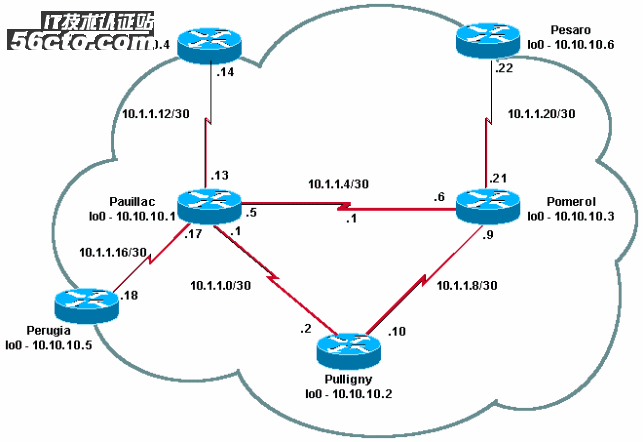
Quick Configuration Guide
Pomerol
Pulligny
Pauillac
Quick Configuration Guide
Complete these steps to configure MPLS:
Set up your network as usual (MPLS needs a standard IP connection in order to establish forwarding bases).
Ensure that the routing protocol (OSPF or IS-IS) is working correctly. These commands are shown in italics in the configurations in this section.
Use the ip cef command (for better performances, use the ip cef distributed command when available) in the general configuration mode (shown in bold in the configurations in this section) to enable.
Use the mpls ip command (or the tag-switching ip command on older Cisco IOS versions) in the general configuration mode and in each interface (shown in bold in the configurations in this section) to enable.
Note: The LSRs must have (up) Loopback interfaces with an address mask of 32 bits.
Pomerol
Current configuration:
!
version 12.2
!
hostname Pomerol
!
ip cef
!--- Enables Cisco Express Forwarding globally.
!
interface Loopback0
ip address 10.10.10.3 255.255.255.255
ip router isis
!--- Assigns an IP address to interface loopback0
!--- and enables IS-IS for IP on the interface.
!
interface Serial0/0
encapsulation frame-relay
!
interface Serial0/0.1 point-to-point
ip address 10.1.1.6 255.255.255.252
ip router isis
tag-switching ip
!--- Enables dynamic Label Switching of
!--- IPv4 packets on an interface.
frame-relay interface-dlci 301
!
interface Serial0/0.2 point-to-point
ip address 10.1.1.9 255.255.255.252
ip router isis
tag-switching ip
frame-relay interface-dlci 303
!
interface Serial0/0.3 point-to-point
ip address 10.1.1.21 255.255.255.252
ip router isis
tag-switching ip
frame-relay interface-dlci 306
!
router isis
net 49.0001.0000.0000.0003.00
is-type level-1
!
ip classless
!
end
Pulligny
Current configuration:
!
version 12.1
!
hostname Pulligny
!
ip cef
!
interface Loopback0
ip address 10.10.10.2 255.255.255.255
!
interface Serial0/1
no ip address
encapsulation frame-relay
!
interface Serial0/0.1 point-to-point
ip address 10.1.1.2 255.255.255.252
ip router isis
tag-switching ip
frame-relay interface-dlci 201
!
interface Serial0/0.2 point-to-point
ip address 10.1.1.10 255.255.255.252
ip router isis
tag-switching ip
frame-relay interface-dlci 203
!
router isis
redistribute static ip
passive-interface Loopback0
net 49.0001.0000.0000.0002.00
is-type level-1
!--- Enables the IS-IS process on the router,
!--- makes loopback interface passive
!--- (does not send IS-IS packets on interface),
!--- and assigns area and system ID to router.
!
ip classless
!
end
Pauillac
Current configuration : 2366 bytes
!
version 12.1
!
hostname pauillac
!
ip cef
!
interface Loopback0
ip address 10.10.10.1 255.255.255.255
ip router isis
!
interface Serial0/0
no ip address
encapsulation frame-relay
!
interface Serial0/0.1 point-to-point
ip address 10.1.1.1 255.255.255.252
ip router isis
tag-switching ip
frame-relay interface-dlci 102
!
interface Serial0/0.2 point-to-point
ip address 10.1.1.5 255.255.255.252
ip access-group 150 out
ip router isis
tag-switching ip
frame-relay interface-dlci 103
!
interface Serial0/0.3 point-to-point
bandwidth 512
ip address 10.1.1.13 255.255.255.252
ip router isis
tag-switching ip
frame-relay interface-dlci 104
!
interface Serial0/0.4 point-to-point
ip address 10.1.1.17 255.255.255.252
ip router isis
tag-switching ip
frame-relay interface-dlci 105
!
!
router isis
net 49.0001.0000.0000.0001.00
is-type level-1
!
ip classless
!
end
Verify
This section provides information you can use to confirm your configuration is working properly.
Certain show commands are supported by the Output Interpreter Tool (registered customers only) , which allows you to view an analysis of show command output.
show tag-switching tdp neighbor
show tag-switching tdp bindings
show tag-switching forwarding-table
show tag-switching forwarding-table a.b.c.d detail
traceroute a.b.c.d
An exhaustive list of commands is included in the MPLS Command Reference. Other sample show commands are described in Configuring Basic MPLS Using OSPF.
Sample Output
The following output focuses on the LDP. The LDP currently implemented in IOS is TDP (Tag Distribution Protocol), which contains some Cisco-proprietary extensions, but it be used with LDP, the IETF official protocol for label distribution. TDP will be replaced by LDP in the future.
You can use the show tag-switching tdp * command to verify the state of TDP. You can see neighbors using the show tag-switching tdp neighbor command.
Pulligny# show tag-switching tdp discovery
Local TDP Identifier:
10.10.10.2:0
TDP Discovery Sources:
Interfaces:
Serial0/0.1: xmit/recv
TDP Id: 10.10.10.1:0
Serial0/0.2: xmit/recv
TDP Id: 10.10.10.3:0
!--- Ensure you are able to ping this IP address
!--- If not, check whether a route exists in the routing table
Pulligny# show tag-switching tdp neighbor
Peer TDP Ident: 10.10.10.1:0; Local TDP Ident 10.10.10.2:0
TCP connection: 10.10.10.1.711 - 10.10.10.2.11001
State: Oper; PIEs sent/rcvd: 27907/27925; ; Downstream
Up time: 2w2d
TDP discovery sources:
Serial0/0.1
Addresses bound to peer TDP Ident:
10.1.1.1 10.1.1.13 10.1.1.17 10.10.10.1
10.1.1.5 10.200.28.89
Peer TDP Ident: 10.10.10.3:0; Local TDP Ident 10.10.10.2:0
TCP connection: 10.10.10.3.11001 - 10.10.10.2.711
State: Oper; PIEs sent/rcvd: 22893/22874; ; Downstream
Up time: 1w6d
TDP discovery sources:
Serial0/0.2
Addresses bound to peer TDP Ident:
10.200.28.91 10.1.1.6 10.1.1.9 10.1.1.21
10.10.10.3You can use the show tag-switching tdp bindings command to view the established bindings between labels and routes.
Pulligny# show tag-switching tdp bindings
(...)
tib entry: 10.10.10.4/32, rev 22
local binding: tag: 21
remote binding: tsr: 10.10.10.1:0, tag: 22
remote binding: tsr: 10.10.10.3:0, tag: 25
tib entry: 10.10.10.6/32, rev 51
local binding: tag: 23
remote binding: tsr: 10.10.10.3:0, tag: 18
remote binding: tsr: 10.10.10.1:0, tag: 20
(...)You can use the show tag-switching forwarding-table command to see which bindings are used to build the LFIB.
Pulligny# show tag-switching forwarding-table
Local Outgoing Prefix Bytes tag Outgoing Next Hop
tag tag or VC or Tunnel Id switched interface
16 Pop tag 10.1.1.4/30 0 Se0/0.2 point2point
Pop tag 10.1.1.4/30 0 Se0/0.1 point2point
17 Pop tag 10.1.1.20/30 0 Se0/0.2 point2point
18 Pop tag 10.10.10.3/32 0 Se0/0.2 point2point
19 Pop tag 10.10.10.1/32 0 Se0/0.1 point2point
20 Pop tag 10.1.1.12/30 0 Se0/0.1 point2point
21 Pop tag 10.1.1.16/30 0 Se0/0.1 point2point
22 20 10.10.10.5/32 0 Se0/0.1 point2point
23 22 10.10.10.6/32 0 Se0/0.2 point2point
24 22 10.10.10.4/32 0 Se0/0.1 point2pointYou can use the show tag-switching forwarding-table 10.10.10.4 detail command to view the details of a given destination.
Pulligny# show tag-switching forwarding-table 10.10.10.4 detail
Local Outgoing Prefix Bytes tag Outgoing Next Hop
tag tag or VC or Tunnel Id switched interface
21 22 10.10.10.4/32 12103 Se0/0.1 point2point
MAC/Encaps=4/8, MTU=1500, Tag Stack{22}
30918847 00016000
Per-packet load-sharingYou can also use the traceroute command, if the network does IP TTL propagation, to view the hops. Refer to Multiprotocol Label Switching on Cisco Routers for more information on the mpls ip ttl propagate command.
Pesaro# traceroute 10.10.10.4
Type escape sequence to abort.
Tracing the route to 10.10.10.4
1 10.1.1.21 [MPLS: Label 25 Exp 0] 296 msec 256 msec 244 msec
2 10.1.1.5 [MPLS: Label 22 Exp 0] 212 msec 392 msec 352 msec
3 10.1.1.14 436 msec * 268 msecNote: Exp 0 appears in the output if the experimental field is used for Quality of Service (QoS).
Troubleshoot
There is currently no specific troubleshooting information available for this configuration.
【编辑推荐】
- CCIE学习之EIGRP基础
- CCIE R&S Troubleshooting 排错实例
- New CCIE R/S 4.0(面试题)Core Knowledge Questions
上一篇:最新路由交换技术全面介绍
下一篇:WCF元数据应用方法介绍