
// We need to input the search string in this box
如何通过 REST API 和 Spring MVC 提取电视节目详细信息?
创始人
2025-07-04 05:50:22
0次

表述性状态传输 (REST)是一种架构风格,它定义了一组用于创建 Web 服务的约束。REST API 是一种无需任何处理即可简单灵活地访问 Web 服务的方式。
Spring MVC是一个用于构建 Web 应用程序的 Web MVC 框架。它是一个与 spring boot、spring-security 等相同的 spring 模块。术语 MVC 代表模型-视图-控制器架构。REST API 调用如今被广泛用于获取各种信息,例如天气、邮政编码、secret、大学详细信息等.
在本文中,让我们尝试通过以下方式获取电视连续剧详细信息。
http://api.tvmaze.com/search/shows?q=<任何电视连续剧名称>例子:
https://api.tvmaze.com/search/shows?q=mahabharataJSON 输出:
[
{
"score": 0.54483813,
"show": {
"id": 60856,
"url": "https://www.tvmaze.com/shows/60856/the-mahabharata",
"name": "The Mahabharata",
"type": "Scripted",
"language": "English",
"genres": [],
"status": "Ended",
"runtime": null,
"averageRuntime": null,
"premiered": "1990-03-10",
"ended": "1990-03-24",
"officialSite": null,
"schedule": {
"time": "",
"days": []
},
"rating": {
"average": null
},
"weight": 5,
"network": {
"id": 269,
"name": "Star Plus",
"country": {
"name": "India",
"code": "IN",
"timezone": "Asia/Kolkata"
},
"officialSite": null
},
"webChannel": null,
"dvdCountry": null,
"externals": {
"tvrage": null,
"thetvdb": 213551,
"imdb": "tt0097810"
},
"image": {
"medium": "https://static.tvmaze.com/uploads/images/medium_portrait/398/996547.jpg",
"original": "https://static.tvmaze.com/uploads/images/original_untouched/398/996547.jpg"
},
"summary": null,
"updated": 1646508699,
"_links": {
"self": {
"href": "https://api.tvmaze.com/shows/60856"
},
"previousepisode": {
"href": "https://api.tvmaze.com/episodes/2289706"
}
}
}
},
{
"score": 0.40868765,
"show": {
"id": 5016,
"url": "https://www.tvmaze.com/shows/5016/mahabharat",
"name": "Mahabharat",
"type": "Scripted",
"language": "Hindi",
"genres": [
"Drama",
"History"
],
"status": "Ended",
"runtime": 20,
"averageRuntime": 20,
"premiered": "2013-09-16",
"ended": "2014-08-16",
"officialSite": "http://www.hotstar.com/#!/mahabharat-435-s",
"schedule": {
"time": "20:30",
"days": [
"Monday",
"Tuesday",
"Wednesday",
"Thursday",
"Friday",
"Saturday",
"Sunday"
]
},
"rating": {
"average": null
},
"weight": 37,
"network": {
"id": 269,
"name": "Star Plus",
"country": {
"name": "India",
"code": "IN",
"timezone": "Asia/Kolkata"
},
"officialSite": null
},
"webChannel": null,
"dvdCountry": null,
"externals": {
"tvrage": 46350,
"thetvdb": 273350,
"imdb": "tt3212600"
},
"image": {
"medium": "https://static.tvmaze.com/uploads/images/medium_portrait/21/54241.jpg",
"original": "https://static.tvmaze.com/uploads/images/original_untouched/21/54241.jpg"
},
"summary": "The story of the throne of Hastinapura, the kingdom ruled by the Kuru clan. The two collateral branches of the family that participate in the struggle of the throne of Hastinapura are the Kaurava and the Pandava. Although the Kaurava is the senior branch of the family, Duryodhana, the eldest Kaurava, is younger than Yudhisthira, the eldest Pandava. Both Duryodhana and Yudhisthira claim to be first in line to inherit the throne. The struggle culminates in the great battle of Kurukshetra, in which the Pandavas are ultimately victorious. The battle produces complex conflicts of kinship and friendship, instances of family loyalty and duty taking precedence over what is right, as well as the converse.
",
"updated": 1604823863,
"_links": {
"self": {
"href": "https://api.tvmaze.com/shows/5016"
},
"previousepisode": {
"href": "https://api.tvmaze.com/episodes/314287"
}
}
}
},
{
"score": 0.38368216,
"show": {
"id": 16607,
"url": "https://www.tvmaze.com/shows/16607/mahabharat",
"name": "Mahabharat",
"type": "Scripted",
"language": "Hindi",
"genres": [
"Drama"
],
"status": "Ended",
"runtime": 45,
"averageRuntime": 45,
"premiered": "1988-10-02",
"ended": "1990-07-15",
"officialSite": null,
"schedule": {
"time": "",
"days": [
"Sunday"
]
},
"rating": {
"average": null
},
"weight": 24,
"network": {
"id": 1093,
"name": "DD National",
"country": {
"name": "India",
"code": "IN",
"timezone": "Asia/Kolkata"
},
"officialSite": null
},
"webChannel": null,
"dvdCountry": null,
"externals": {
"tvrage": null,
"thetvdb": 84349,
"imdb": "tt0158417"
},
"image": {
"medium": "https://static.tvmaze.com/uploads/images/medium_portrait/55/138442.jpg",
"original": "https://static.tvmaze.com/uploads/images/original_untouched/55/138442.jpg"
},
"summary": "Mahabharat is a successful Indian television series based on the ancient Indian epic Mahabharata. The 94-episode series originally ran from 1988 to 1990. It was produced by B. R. Chopra and directed by his son, Ravi Chopra.
",
"updated": 1573325769,
"_links": {
"self": {
"href": "https://api.tvmaze.com/shows/16607"
},
"previousepisode": {
"href": "https://api.tvmaze.com/episodes/762035"
}
}
}
}
]使用Spring框架,让我们尝试提取REST API并将其呈现在页面上。
项目结构:
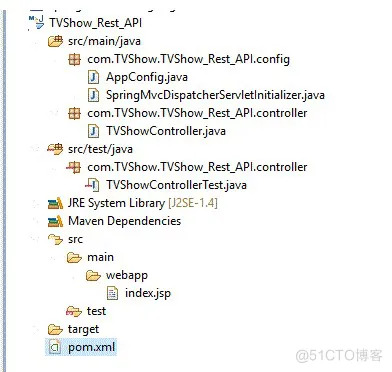
pom.xml 编写:
	4.0.0
	com.TVShow.TVShow_Rest_API
	TVShow_Rest_API
	war
	0.0.1-SNAPSHOT
	TVShow
	http://maven.apache.org

		false
		5.1.0.RELEASE


			org.springframework
			spring-webmvc
			${spring-version}


			org.springframework
			spring-test
			${spring-version}


			javax.servlet.jsp.jstl
			javax.servlet.jsp.jstl-api
			1.2.1


			taglibs
			standard
			1.1.2


			javax.servlet
			javax.servlet-api
			3.1.0
			provided


			javax.servlet.jsp
			javax.servlet.jsp-api
			2.3.1
			provided


			com.google.code.gson
			gson
			2.8.6


			commons-io
			commons-io
			2.5


			junit
			junit
			4.12
			test


		TVShow
		src/main/java


				maven-compiler-plugin
				3.5.1

					1.8
					1.8


org.apache.maven.plugins
maven-war-plugin
3.3.2


		org.codehaus.mojo
		tomcat-maven-plugin
		1.0-beta-1
index.jsp 编写:
这是项目部署到tomcat时渲染的页面
TVShow
// for making the page styles are applied
-----------------------------------
©著作权归作者所有:来自51CTO博客作者demo007x的原创作品,请联系作者获取转载授权,否则将追究法律责任
如何通过 REST API 和 Spring MVC 提取电视节目详细信息?
https://blog.51cto.com/demo007x/7917153输出:
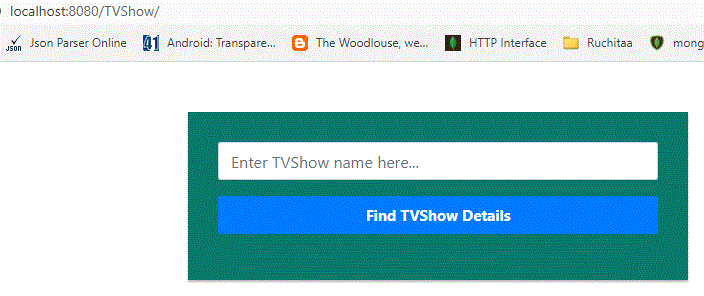
在输入框中输入任何电视节目名称后,我们将获得以下详细信息。
执行过程:
从 JSP 页面,使用搜索字符串调用“GET”方法,并将其重定向到 Spring Controller 类,其中 REST API URL http://api.tvmaze.com/search/shows?q= 被调用,它将创建上面给出的 JSON 数组,从中,我们使用下面的参数:
"score", "url" and "imdb" values alone

Example:
"score": 0.42338097,
"url": "https://www.tvmaze.com/shows/16607/mahabharat",
"imdb": "tt0158417"
实际上,在这个页面上,我们只检索了 TVShowScore、TVShow URL 和 IMDB。但我们可以获取 JSON 中提供的所有其他详细信息。检索数据和解析 JSON 输出所需的代码如下。实现流程的重要必要文件
AppConfig.java 编写:
import org.springframework.context.annotation.Bean;
import org.springframework.context.annotation.ComponentScan;
import org.springframework.context.annotation.Configuration;
import org.springframework.web.servlet.config.annotation.EnableWebMvc;
import org.springframework.web.servlet.view.InternalResourceViewResolver;
import org.springframework.web.servlet.view.JstlView;

@Configuration
@EnableWebMvc
@ComponentScan(basePackages = { "com.TVShow.TVShow_Rest_API" })
public class AppConfig {

	@Bean
	public InternalResourceViewResolver resolver() {
		InternalResourceViewResolver resolver = new InternalResourceViewResolver();
		resolver.setViewClass(JstlView.class);
		resolver.setPrefix("/");
		resolver.setSuffix(".jsp");
		return resolver;
	}

}
SpringMvcDispatcherServletInitializer.java:
import org.springframework.web.servlet.support.AbstractAnnotationConfigDispatcherServletInitializer;

public class SpringMvcDispatcherServletInitializer extends AbstractAnnotationConfigDispatcherServletInitializer {

	@Override
	protected Class[] getRootConfigClasses() {
		return null;
	}

	@Override
	protected Class[] getServletConfigClasses() {
		return new Class[] { AppConfig.class };
	}

	@Override
	protected String[] getServletMappings() {
		return new String[] { "/" };
	}

}
TVShowController.java:
import java.io.BufferedReader;
import java.io.IOException;
import java.io.InputStreamReader;
import java.net.HttpURLConnection;
import java.net.URL;
import java.util.ArrayList;
import java.util.Iterator;
import java.util.StringTokenizer;

import org.springframework.stereotype.Controller;
import org.springframework.web.bind.annotation.RequestMapping;
import org.springframework.web.bind.annotation.ResponseBody;

import com.google.gson.Gson;
import com.google.gson.JsonArray;
import com.google.gson.JsonElement;
import com.google.gson.JsonObject;

@Controller
public class TVShowController {

	@RequestMapping("/getTVShowDetailsBySearchString")
	public @ResponseBody
	JsonObject getTVShowDetailsBySearchString(String searchStr) throws IOException {
		// According to the search string, JSONArray
		// or JSON Object is constructed.
		// In our case, it is producing JSONArray
		JsonArray jsonArray = new JsonArray();
		jsonArray = getTVShowDetailsBySearchStr(searchStr);
		JsonObject finalJsonObject = new JsonObject();
		ArrayList scoreList = new ArrayList();
		ArrayList showUrlList = new ArrayList();
		ArrayList showUrlLinks = new ArrayList();
		ArrayList telecastedList = new ArrayList();
		ArrayList imdbList = new ArrayList();
		Iterator objectIterator = jsonArray.iterator();
		// Iterating
		while(objectIterator.hasNext()) {
			JsonElement object = objectIterator.next();
			JsonObject jObj = object.getAsJsonObject();
			// We have to get the score and
			// replace the special characters
			scoreList.add(jObj.get("score").toString().replaceAll("^\"|\"$", ""));
			// Similarly show
			showUrlList.add(jObj.get("show").toString().replaceAll("^\"|\"$", ""));

		}

		for (int i = 0;i < showUrlList.size();i++) {

			StringTokenizer jsonTokenizer = new StringTokenizer(showUrlList.get(i).toString(),",");
			String expectedTag = null;
			int idx = 0;
			while (jsonTokenizer.hasMoreTokens()) {
				expectedTag = jsonTokenizer.nextToken();
				if (expectedTag.contains("url")) {
					showUrlLinks.add(expectedTag.substring(7,expectedTag.length()-1).toString());
				}
				if (expectedTag.contains("timezone")) {
					telecastedList.add(expectedTag.substring(12,expectedTag.length()-3).toString());
				}
				if (expectedTag.contains("imdb")) {
					imdbList.add(expectedTag.substring(8,expectedTag.length()-2).toString());
				}
		}
	}
		finalJsonObject.addProperty("scores", scoreList.toString());
		finalJsonObject.addProperty("scoresize", scoreList.size());
		finalJsonObject.addProperty("url", showUrlLinks.toString());
		finalJsonObject.addProperty("urlsize", showUrlLinks.size());
		finalJsonObject.addProperty("timezone", telecastedList.toString());
		finalJsonObject.addProperty("imdb", imdbList.toString());
		finalJsonObject.addProperty("imdbsize", imdbList.size());
		// After retrieving the elements,
		// in an object , all are constructed
		return finalJsonObject;
	}

	private JsonArray getTVShowDetailsBySearchStr(String searchString) throws IOException {

		StringBuilder responseData = new StringBuilder();
		JsonArray jsonArray = null;

		URL url = null;
		// http://api.tvmaze.com/search/shows?q=
		// is the url to access the TV show details
		url = new URL("http://api.tvmaze.com/search/shows?q=" + searchString);

		HttpURLConnection con = (HttpURLConnection) url.openConnection();
		con.setRequestMethod("GET");
		con.setRequestProperty("User-Agent", "Mozilla/5.0");
		int responseCode = con.getResponseCode();

		System.out.println("\nSending 'GET' request to URL : " + url);
		// System.out.println("Response Code : " + responseCode);

		try (BufferedReader in = new BufferedReader(
				new InputStreamReader(con.getInputStream()))) {

			String line;

			while ((line = in.readLine()) != null) {
				responseData.append(line);
			}
			// It is getting converted to
			// JSONArray by means of below code
			jsonArray = new Gson().fromJson(responseData.toString(), JsonArray.class);
		}
		return jsonArray;
	}
}
-----------------------------------
©著作权归作者所有:来自51CTO博客作者demo007x的原创作品,请联系作者获取转载授权,否则将追究法律责任
如何通过 REST API 和 Spring MVC 提取电视节目详细信息?
https://blog.51cto.com/demo007x/7917153
结论
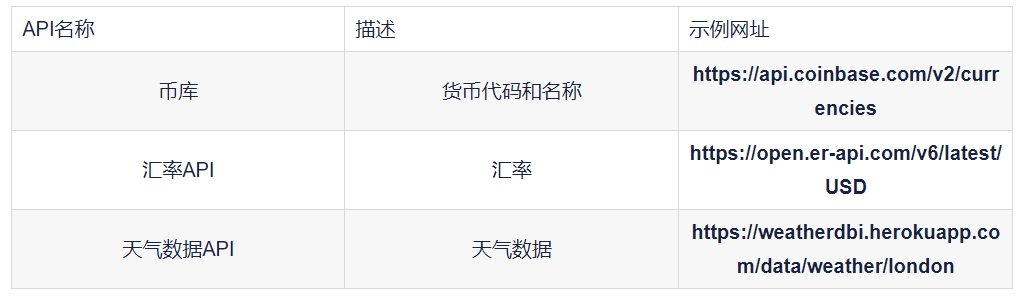
通过使用 Spring-webmvc,我们可以从 REST API 调用中获取详细信息。上面就是一个很好的例子。同样,有很多开源 REST API 调用可供使用。这意味着我们可以使用它们来检索数据。开源 REST API 调用的几个示例。
相关内容
热门资讯
PHP新手之PHP入门
PHP是一种易于学习和使用的服务器端脚本语言。只需要很少的编程知识你就能使用PHP建立一个真正交互的...
网络中立的未来 网络中立性是什...
《牛津词典》中对“网络中立”的解释是“电信运营商应秉持的一种原则,即不考虑来源地提供所有内容和应用的...
各种千兆交换机的数据接口类型详...
千兆交换机有很多值得学习的地方,这里我们主要介绍各种千兆交换机的数据接口类型,作为局域网的主要连接设...
粉嫩如何诠释霸道 东芝M805...
“霸道粉”是个什么玩意东芝M805拿过来的时候,笔者扑哧笑了,不是笑这款笔记本,而是笑这款产品的颜色...
什么是大数据安全 什么是大数据...
在《为什么需要大数据安全分析》一文中,我们已经阐述了一个重要观点,即:安全要素信息呈现出大数据的特征...
如何利用交换机和端口设置来管理...
在网络管理中,总是有些人让管理员头疼。下面我们就将介绍一下一个网管员利用交换机以及端口设置等来进行D...
全面诠释网络负载均衡
负载均衡的出现大大缓解了服务器的压力,更是有效的利用了资源,提高了效率。那么我们现在来说一下网络负载...
如何允许远程连接到MySQL数...
[[277004]]【51CTO.com快译】默认情况下,MySQL服务器仅侦听来自localhos...
30分钟搞定iOS自定义相机
最近公司的项目中用到了相机,由于不用系统的相机,UI给的相机切图,必须自定义才可以。就花时间简单研究...
Intel将Moblin社区控...
本周二,非营利机构Linux基金会宣布,他们将担负起Moblin社区的管理工作,而这之前,Mobli...