
完全概括Cisco 路由器VPN配置语句
创始人
2024-06-13 09:30:51
0次
Cisco 路由器VPN配置对于网络安全来说是非藏重要的,同时在使用过程中让用户更加的方面快捷。本实验借助于Cisco 2600路由器,通过Cisco 路由器VPN配置实现蓝色学苑,一分部和二分部之间的网络互联,为了贴近实用性,中间仍然通过Cisco 3640 模拟ISP。通过在网络基础部分的介绍,各位应该对VPN路由技术有了一定的认识,在VPN的实现中主要有两个方面:建立VPN Tunnel和IPSec的加密具体拓扑图如下:
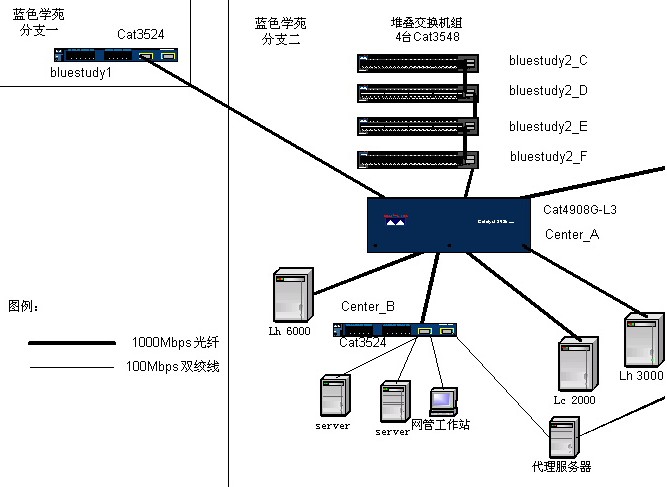
- Cisco 2600 with GRE Tunnel
- Current configuration
- !
- version 12.0
- sevice timestamps debug uptime
- sevice timestamps log uptime
- sevice password-encryption
- !
- hostname bluestudy1
- !enable passsword cisco!
- memory-size iomem 25
- ip subnet-zero
- no ip domain-lookup
- !
- interface Tunnel0
- ip address 172.16.101.1 255.255.255.0
- no ip directed-broadcast
- ip mtu 1467
- tunnel sourece 199.1.1.2
- tunnel destination 199.1.2.2
- !
- interface serial0/0
- no ip address
- no ip directed-broadcast
- encapsulation frame-relay
- no ip mroute-cache
- frame-relay lmi-type ansi
- !interface serial0/0.1 point-to-point
- description connected to internet
- ip address 199.1.1.2 255.255.255.248
- no ip directed-broadcast
- ip nat outside
- no arp frame-relay
- frame-relay interface-dlci 111
- !
- !
- interface ethernet0/0
- ip address 172.16.1.1 255.255.255.0
- no ip directed-broadcast
- ip nat inside
- !
- router eigrp 100
- network 172.16.0.0
- !
- router rip
- version 2
- network 172.16.0.0
- no auto-summary
- !
- ip nat pool bluestudy 199.1.1.3 199.1.1.10 netmask 255.255.255.248
- ip nat inside sourece list 2 pool bluestudy overload
- ip nat inside sourece static 172.16.1.3 199.1.1.5
- ip classless
- ip route 0.0.0.0 0.0.0.0 srial0/0.1
- ip http server
- !
- access-list 2 permit 172.16.1.0 0.0.0.255
- snmp-server community public RO
- !
- line con 0
- exec-timeout 0 0
- password cisco
- login
- transport input none
- line aux 0
- line vty 0 4
- password cisco
- login
- !
- end
- Cisco 2600 Configuration with IPSec
- Current configuration
- !
- version 12.0
- sevice timestamps debug uptime
- sevice timestamps log uptime
- sevice password-encryption
- !
- hostname bluestudy1
- !
- enable passsword cisco
- !
- memory-size iomem 25
- ip subnet-zero
- no ip domain-lookup
- !
- crypto isakmp key policy 1
- authentication pre-share
- group 2
- crypto isakmp key slurpee-machine address 172.16.101.2
- !
- crypto ipsec transform-set test ah-sha-hmac esp-des esp-sha-hmac
- !
- set transform-set test
- !
- crypto map bluestudy 10 ipsec-isakmp
- set peer 172.16.101.2
- set transform-set test
- match address 101
- !
- interface Tunnel0
- ip address 172.16.101.1 255.255.255.0
- no ip directed-broadcast
- ip mtu 1467
- login
- !
- end
以上就是关于Cisco 路由器VPN配置语句的全面概括,希望您看完后,会对Cisco 路由器VPN配置有更加深刻的了解,保证我们的网络安全。
相关内容
热门资讯
PHP新手之PHP入门
PHP是一种易于学习和使用的服务器端脚本语言。只需要很少的编程知识你就能使用PHP建立一个真正交互的...
网络中立的未来 网络中立性是什...
《牛津词典》中对“网络中立”的解释是“电信运营商应秉持的一种原则,即不考虑来源地提供所有内容和应用的...
各种千兆交换机的数据接口类型详...
千兆交换机有很多值得学习的地方,这里我们主要介绍各种千兆交换机的数据接口类型,作为局域网的主要连接设...
粉嫩如何诠释霸道 东芝M805...
“霸道粉”是个什么玩意东芝M805拿过来的时候,笔者扑哧笑了,不是笑这款笔记本,而是笑这款产品的颜色...
如何利用交换机和端口设置来管理...
在网络管理中,总是有些人让管理员头疼。下面我们就将介绍一下一个网管员利用交换机以及端口设置等来进行D...
什么是大数据安全 什么是大数据...
在《为什么需要大数据安全分析》一文中,我们已经阐述了一个重要观点,即:安全要素信息呈现出大数据的特征...
只需三步,让你掌握阿尔法路由器...
请参照以下阿尔法路由器设置方法,通过浏览器进入及设置宽带路由器。经过这三个步骤的设置,基本上能够熟悉...
如何更省钱? 近期特价热门硒鼓...
如今激光打印设备已经成为商务或企业的绝对主力办公设备,但采购者往往忽视了激光打印设备所用的耗材,相对...
全面诠释网络负载均衡
负载均衡的出现大大缓解了服务器的压力,更是有效的利用了资源,提高了效率。那么我们现在来说一下网络负载...
如何允许远程连接到MySQL数...
[[277004]]【51CTO.com快译】默认情况下,MySQL服务器仅侦听来自localhos...